ND320: Difference between revisions
→Pictures: added picture of mainboard |
→Pictures: add more keyboard pictures |
||
| (8 intermediate revisions by 2 users not shown) | |||
| Line 1: | Line 1: | ||
'''ND320''' is the product number of the '''Tandberg TDV 2200/9 S''' terminal. | '''ND320''' is the product number of the '''Tandberg TDV 2200/9 S''' terminal. | ||
{{Stub}} | {{Stub}} | ||
== EPROMs == | |||
The mainboard contains three EPROMS: U32 (2764), U63 (27128A) - character generator and U93 (27128A). If this terminal follows the previous ones in the TDV 2200-series, one EPROM contains the emulator, while the rest (one or two) contains primitives. For this terminal it is unknown which of U32 and U93 is emulator / primitives. Dumps are available<ref>[http://heim.bitraf.no/tingo/td/tandberg-tdv-2200-9s.html Tandberg TDV 2200/9S - files]</ref>. [https://github.com/sebras sebras] has made a python script to extract the font from the character generator dump and convert it to an image, see sebras/norsk-data-vdu-301-s<ref>[https://github.com/sebras/norsk-data-vdu-301-s sebras/norsk-data-vdu-301-s]</ref> on Github. | |||
<gallery> | |||
File:Tdv2200 9 s EPROM U32.jpg| U32 | |||
File:Tdv2200 9 s EPROM U63.jpg| U63 | |||
File:Tdv2200 9 s EPROM U93.jpg| U93 | |||
</gallery> | |||
== Pictures == | == Pictures == | ||
| Line 8: | Line 17: | ||
File:Nd320 labels bottom 1 IMG 20210322 144955204.jpg| bottom label 1 | File:Nd320 labels bottom 1 IMG 20210322 144955204.jpg| bottom label 1 | ||
File:Nd320 labels bottom 2 IMG 20210322 145843637.jpg| bottom label 2 | File:Nd320 labels bottom 2 IMG 20210322 145843637.jpg| bottom label 2 | ||
</gallery> | |||
Keyboard pictures | |||
<gallery> | |||
File:Nd320 keyboard 1 IMG 20210326 155820716.jpg | |||
File:Nd320 keyboard 2 IMG 20210326 155828348.jpg | |||
File:Nd320 keyboard 3 IMG 20210326 155847942.jpg | |||
File:Nd320 keyboard 4 IMG 20210326 155858692.jpg | |||
File:Nd320 keyboard 5 IMG 20210326 155925962.jpg | |||
File:Nd320 keyboard 6 IMG 20210326 155946517.jpg | |||
</gallery> | |||
another ND320 keyboard | |||
<gallery> | |||
File:Tandberg TDV2200S keyboard top 1 IMG 20240818 153930758.jpg | |||
File:Tandberg TDV2200S keyboard top 2 IMG 20240818 153936190.jpg | |||
File:Tandberg TDV2200S keyboard bot 1 IMG 20240818 154001103.jpg | |||
File:Tandberg TDV2200S keyboard inside 1 IMG 20240818 154049493.jpg | |||
File:Tandberg TDV2200S keyboard inside 2 IMG 20240818 154056913.jpg | |||
File:Tandberg TDV2200S keyboard inside 3 IMG 20240818 154105110.jpg | |||
File:Tandberg TDV2200S keyboard inside 4 IMG 20240818 154108895.jpg | |||
File:Tandberg TDV2200S keyboard inside 5 IMG 20240818 154113572.jpg | |||
File:Tandberg TDV2200S keyboard inside 6 IMG 20240818 154137612.jpg | |||
</gallery> | </gallery> | ||
| Line 14: | Line 46: | ||
File:Nd320 mainboard from back of terminal IMG 20210322 154339740.jpg| mainboard, seen from back of terminal | File:Nd320 mainboard from back of terminal IMG 20210322 154339740.jpg| mainboard, seen from back of terminal | ||
</gallery> | </gallery> | ||
Pictures of the mainboard | |||
<gallery> | |||
File:Tdv2200 9 s mainboard 1 IMG 20210330 213814603.jpg | |||
File:Tdv2200 9 s mainboard 2 IMG 20210330 213822708.jpg | |||
File:Tdv2200 9 s mainboard 3 IMG 20210330 213829643.jpg | |||
File:Tdv2200 9 s mainboard 4 IMG 20210330 213834654.jpg | |||
File:Tdv2200 9 s mainboard 5 IMG 20210330 213844251.jpg | |||
File:Tdv2200 9 s mainboard 6 IMG 20210330 213900894.jpg | |||
File:Tdv2200 9 s mainboard 7 IMG 20210330 213906091.jpg | |||
File:Tdv2200 9 s mainboard 8 IMG 20210330 213916342.jpg | |||
File:Tdv2200 9 s mainboard 9 IMG 20210330 213919567.jpg | |||
</gallery> | |||
Configuration screens. Hold down Ctrl and press "HELP" twice. | |||
<gallery> | |||
File:Tdv 2200 9 s configuration 1 IMG 20210405 133339308.jpg| configuration menu | |||
File:Tdv 2200 9 s configuration 2 IMG 20210405 133347065.jpg| convenience switches | |||
File:Tdv 2200 9 s configuration 3 IMG 20210405 133357434.jpg| function switches | |||
File:Tdv 2200 9 s configuration 4 IMG 20210405 133407003.jpg| communication switches | |||
File:Tdv 2200 9 s configuration 5 IMG 20210405 133420627.jpg| PUSH-key menu | |||
File:Tdv 2200 9 s configuration 6 IMG 20210405 134755620.jpg| tabulation rack | |||
File:Tdv 2200 9 s configuration 7 IMG 20210405 133446205.jpg | |||
File:Tdv 2200 9 s configuration 8 IMG 20210405 133456506.jpg| exit menu | |||
</gallery> | |||
Font used by terminal | |||
<gallery> | |||
File:Font TDV 2200-9 S.png | |||
</gallery> | |||
ND 320 with Graphics option, pictures by Frodevan<ref>[https://github.com/Frodevan Github - Frodevan]</ref>. | |||
<gallery> | |||
File:ND320 MB F cropped.JPG | mainboard, component side | |||
File:ND320 MB B cropped.JPG | mainboard, solder side | |||
File:ND320 GFX F cropped.JPG| graphics board, component side | |||
File:ND320 GFX B cropped.JPG | grephics board, solder side | |||
</gallery> | |||
== Resources == | |||
The Github repository Supermagnum/Tandberg<ref>[https://github.com/Supermagnum/Tandberg Github - Supermagnum/Tandberg]</ref> contains more ROM dumps for this terminal. | |||
== References == | == References == | ||
Latest revision as of 14:30, 18 August 2024
ND320 is the product number of the Tandberg TDV 2200/9 S terminal.
 |
This article is a stub. You can improve NDWiki by expanding it. |
EPROMs
The mainboard contains three EPROMS: U32 (2764), U63 (27128A) - character generator and U93 (27128A). If this terminal follows the previous ones in the TDV 2200-series, one EPROM contains the emulator, while the rest (one or two) contains primitives. For this terminal it is unknown which of U32 and U93 is emulator / primitives. Dumps are available[1]. sebras has made a python script to extract the font from the character generator dump and convert it to an image, see sebras/norsk-data-vdu-301-s[2] on Github.
-
 U32
U32 -
 U63
U63 -
 U93
U93


Pictures
Pictures of the terminal.
-
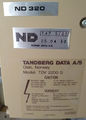 labels on the back
 -
 bottom label 1
 -
 bottom label 2


Keyboard pictures


another ND320 keyboard


Pictures of the inside.
-
 mainboard, seen from back of terminal

Pictures of the mainboard


Configuration screens. Hold down Ctrl and press "HELP" twice.
-
 configuration menu
 -
 convenience switches
 -
 function switches
 -
 communication switches
 -
 PUSH-key menu
 -
 tabulation rack
 -

-
 exit menu


Font used by terminal

ND 320 with Graphics option, pictures by Frodevan[3].
-
 mainboard, component side
 -
 mainboard, solder side
 -
 graphics board, component side
 -
 grephics board, solder side


Resources
The Github repository Supermagnum/Tandberg[4] contains more ROM dumps for this terminal.